 seyret
ANDROID · ANDROID TV · KAPALI TEST
Android betaya katıl
İki adım. Telefonundaki Google hesabıyla yap.
-
Gruba katıl
Tek tık. Sana e-posta gelmez.
Gruba katıl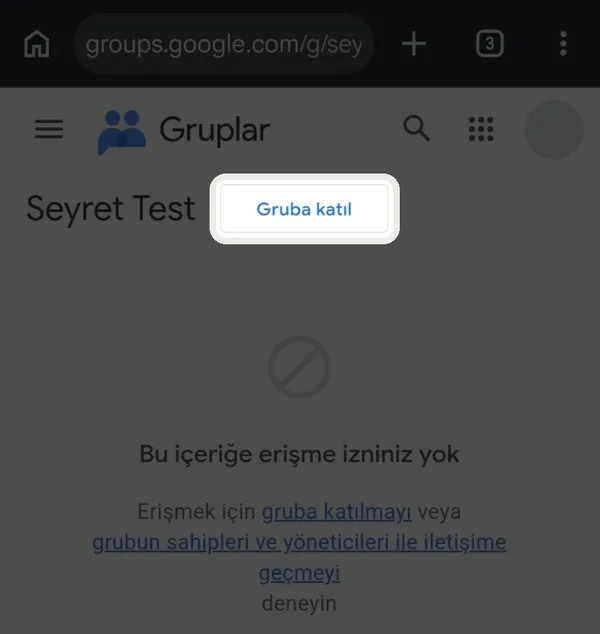
“Bu içeriğe erişme izniniz yok” yazısı normal. Üstteki Gruba katıl’a dokun. -
Testçi ol, kur
“Test kullanıcısı ol”a dokun, aynı sayfadan Google Play’den kur.
Testçi ol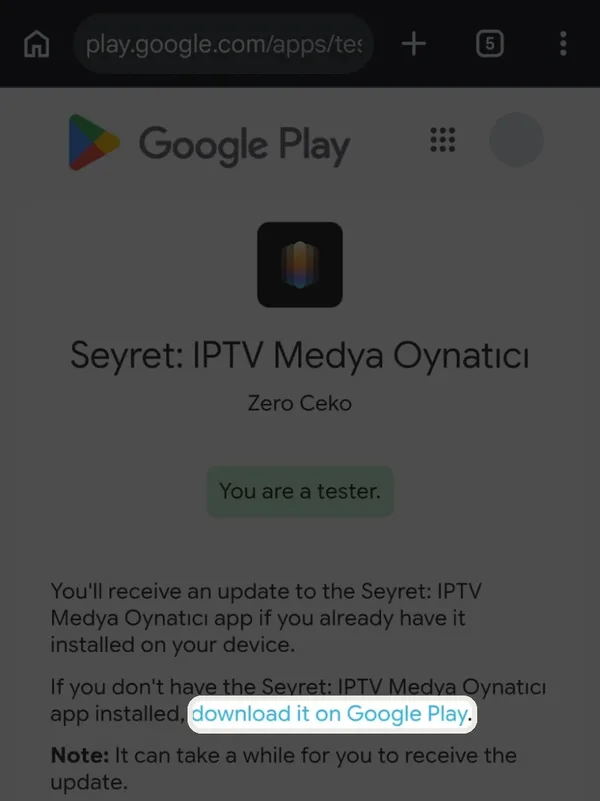
“You are a tester” yazısını görünce işaretli download it on Google Play bağlantısına dokun ve kur.
Kurduktan sonra testten çıkma, o kadar. Google, uygulamanın herkese açılması için 12 kişinin 14 gün testte kalmasını istiyor. Soru ve hata: hello@seyret.stream
Seyret bir içerik sağlayıcı değil. Kanal, film, dizi ya da abonelik yok; kendi yayın kaynağınla kullanırsın.
ANDROID · ANDROID TV · CLOSED TEST
Join the Android beta
Two steps. Use the Google account on your phone.
-
Join the group
One click. You get no email.
Join the groupSeeing “You don't have permission to access this content” is normal. Tap Join group at the top. -
Become a tester, install
Tap “Become a tester”, then install from Google Play on the same page.
Become a testerOnce you see “You are a tester”, tap the highlighted download it on Google Play link and install.
After installing, stay in the test. That is all. Google needs 12 people in the test for 14 days before the app goes public. Questions and bugs: hello@seyret.stream
Seyret is not a content provider. No channels, films, series or subscriptions; you use it with your own stream source.